
Login & OTP
Q789 Login Guide — OTP, Password and Every Fix That Works
How Q789 login really works on a Pakistani number: the password route, the OTP route, forgot-password recovery, and the fix for each error that locks people out.

Q789 login needs three things: your registered 03 mobile number, either your password or a fresh SMS OTP, and the official app installed on your phone. There is no browser login for Q789 — any website asking for your OTP is a phishing page. This guide covers both login routes and the fix for every error that locks Pakistani users out.
How to login to Q789 step by step
- Open the Q789 app from your home screen. If it is not installed yet, follow the APK download guide first.
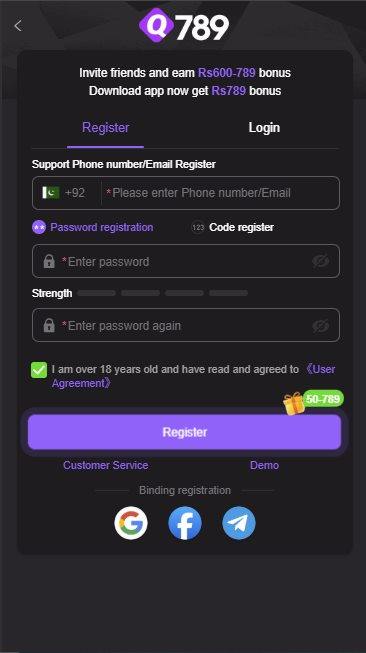
- Tap Login on the welcome screen. Registration and login share the same panel, so make sure the Login tab is selected and not Register.
- Leave the +92 country selector alone and type your number as 03XXXXXXXXX with no spaces, dashes or country code.
- Choose your method: type your password, or switch to Code register / OTP and tap to request a one-time code by SMS.
- Tap Login. The dashboard loads with your wallet balance, game categories and bonus tabs.
OTP login versus password login
Q789 supports both routes from the same screen. They behave differently when you are on a weak signal or travelling, so it is worth knowing which one to reach for.
| Factor | Password login | OTP login |
|---|---|---|
| Needs SMS signal | No | Yes |
| Speed on a good signal | Instant | 10 to 60 seconds |
| Works with a VPN on | Usually | Often blocked |
| Works on a second device | Yes | Only with the SIM in hand |
| Risk if credentials leak | Higher — reusable | Lower — single use |
| Best for | Daily logins on your own phone | Recovery and first-time login |
A practical routine: set a strong password for everyday logins, and keep the OTP route as your recovery path. Never store the password in a notes app alongside your JazzCash PIN.
Q789 OTP not received: what actually fixes it
OTP delivery failures are the number one Q789 login complaint in Pakistan. Work through these in order rather than hammering the resend button, which triggers a rate limit.
- Wait the full 120 seconds. SMS gateway queues in Pakistan routinely add a minute or more at peak evening hours. Resending resets the queue position.
- Turn off any VPN or proxy. Q789 treats foreign IP addresses as suspicious and frequently suppresses the OTP entirely.
- Check the SIM is the active data or SMS SIM. On dual-SIM phones the code goes to the registered number, not the one currently carrying data.
- Clear your SMS inbox. A full message store on budget Android phones silently drops new SMS.
- Toggle flight mode on and off to force a fresh network registration, then request one more code.
- Check the spam or blocked folder in your messaging app. Short-code senders are often filtered automatically.
- Try the password route instead and reset your password later from inside the app once you are in.
Never ask anyone to receive the OTP for you. Q789 support will not request your code, and no legitimate agent needs it. Anyone who does is taking over your account, not helping you into it.
Reset a forgotten Q789 password
- On the login panel, tap Forgot Password.
- Enter the registered 03 number attached to the account.
- Request the verification code and enter it from the SMS.
- Set a new password: at least eight characters mixing upper case, lower case, a number and a symbol.
- Confirm it, then log in with the new credentials.
If the reset screen says the number is not registered, you almost certainly signed up on a different SIM. There is no email recovery on Q789, so the registered number is the only key to the account.
Q789 login errors and what each one means
| What you see | What it means | What to do |
|---|---|---|
| Invalid account or password | Number typed with +92, or wrong password | Retype as 03XXXXXXXXX; use Forgot Password after two failures |
| Verification code error | Expired or mistyped OTP | Request a fresh code and enter it within 2 minutes |
| Operation too frequent | Rate limit from repeated OTP requests | Close the app and wait 10 minutes before retrying |
| Network error / request failed | Weak data connection or an active VPN | Switch off the VPN, move to stable 4G or Wi-Fi |
| Account frozen or restricted | Multiple accounts detected on one device | Contact in-app support; run one account per device only |
| App closes on the login screen | Corrupted install or low RAM | Reinstall the official APK and restart the phone |
| Session expired repeatedly | Outdated app version | Update to the current APK build |
Jazz, Zong, Telenor and Ufone: OTP notes
OTP delivery is handled by SMS aggregators, and each Pakistani operator behaves slightly differently under load.
- Jazz and Warid: generally the fastest delivery. If codes stop arriving, check that promotional-SMS blocking is not switched on for your number.
- Zong: reliable on 4G, but codes can be delayed several minutes when the handset falls back to 3G indoors.
- Telenor: aggressive spam filtering. Look in the blocked or spam folder of your messaging app before resending.
- Ufone: occasional short-code routing gaps in rural areas. The password route is the more dependable option.
If codes never arrive on one network, register on a second SIM you actually control rather than borrowing someone else's number — withdrawals are tied to the registered account holder.
Keeping your Q789 login secure
- Log in only inside the official app. There is no legitimate Q789 web login form.
- Use a password you do not reuse on any wallet, email or social account.
- Never share the OTP, password, or a screen-share session with anyone claiming to be support.
- Keep your Q789 account name identical to your JazzCash or Easypaisa name, or withdrawals will fail.
- Log out on shared or borrowed phones, and remove the app before selling a device.
- Treat any offer of a modified APK, unlimited balance or admin access as a credential-harvesting attempt.
The scam patterns to watch for are catalogued in the fake Q789 pages section of our main guide.
Get the official app first
Login only works inside the genuine Q789 APK. Download it, register your 03 number, and claim the welcome bonus.
Q789 login FAQs
Can I login to Q789 from a web browser?
No. Q789 login happens inside the Android app only. Any website presenting a Q789 login form and asking for your OTP is a phishing page — close it and do not enter anything.
How long is a Q789 OTP valid?
Around two minutes. If you enter a code after it expires you will see a verification error, so request a fresh one instead of reusing an old SMS.
Why does Q789 reject my number when it is correct?
The +92 country code is already applied by the selector. Typing 92 or +92 again, or adding spaces and dashes, produces an invalid number. Enter it as 03XXXXXXXXX only.
Can I login to Q789 on two phones at once?
You can login on a second device, but concurrent sessions usually push the first device out. Running multiple accounts from one device is what triggers restrictions, not logging in from a new phone.
What if I changed my mobile number?
Contact in-app support before you lose access to the old SIM. Recovery is tied to the registered number, and there is no email fallback on Q789.
Does a VPN break Q789 login?
Often, yes. A foreign IP address commonly suppresses OTP delivery and can trigger a security block. Turn the VPN off before logging in.